Have a go.
Work through short practice sessions with readable questions, diagrams and mathematical input. Use a hint when you need one.
Practice, not passive scrollingFirst reveal · pilot preparation
Turn course material into guided practice, interactive problems and scheduled recall.
Built with the first semester in mind. One clear next step, with feedback as you practise.
Try the demos without an account. Meet Pocket, too ↗
From material to understanding
Having the notes is one thing.
Knowing what to do with them is another.
01 / The experience
Open your course. Take the next step.
Leave with something to build on.
Work through short practice sessions with readable questions, diagrams and mathematical input. Use a hint when you need one.
Practice, not passive scrollingGet feedback on each checked practice answer. Supported numeric, formula and multiple-choice questions use deterministic checks.
An explanation, not just a scorePick up saved sessions and revisit topics through scheduled memory checks. Completing questions and remembering later are different things.
Continuity across study sessionsInside the engine / interactive showcase
Explore a Jumo-inspired turbojet.
More thrust, within a temperature limit.
Increase model thrust by 10% without exceeding 1,100 K at the turbine inlet. Explore the airflow, then try your design.
Change a design value, then check. These are model outputs—not measured Jumo performance.
More heat can increase jet speed, but consumes your temperature margin. Compression also raises the air temperature—and the turbine must supply the compressor’s work.
One engine. Follow the flow. Select a component to see its role.
Visual reconstruction informed by museum photographs, not a scan or dimensionally exact CAD model. Blade profiles, pipe routing and small fittings are simplified. Cutaway surfaces and component highlighting are presentation aids.
Historical reference: pressure ratio 3.1, static thrust 8.9 kN and speed 8,700 rpm, as listed by the Deutsches Museum. These are reference specifications, not simulated outputs. Architecture cross-reference: Smithsonian Jumo 004B.
A steady, zero-dimensional turbojet cycle computes station-average total temperature, pressure, shaft work, fuel flow and static thrust. Constant properties: γ = 1.4, R = 287 J/(kg·K). Airflow 21.2 kg/s; ambient 288.15 K and 101.325 kPa; inlet recovery 99%; compressor efficiency 80%, turbine 85%, shaft 98%, burner 98%; burner pressure loss 5%; fuel heating value 43 MJ/kg. These are teaching assumptions, not a fitted Jumo operating map.
The ideal convergent nozzle includes choking and pressure thrust. Its effective exit area is matched to the imposed mass flow at each design point; the historical drawing does not resize. Pressure ratio and temperature are independent design inputs, not real throttle controls. The 1,100 K ceiling is a teaching constraint, not an approved historical limit.
Flow paths are prescribed inside a simplified annular passage and six cans. Ghosted metal reveals the interior. Tracer speed is illustrative; blade turning, boundary layers, cooling-air splits, combustion recirculation, turbulence and the external jet are not solved. Colour encodes station-average total temperature: static temperature falls through the nozzle while total temperature remains constant. No CFD, hardware certification or real-engine modification guidance.
Equations: NASA compressor · Brayton cycle · thrust.
Educational cycle model
Illustrative paths · not CFD
A 3D visual reconstruction paired with a simplified thermodynamic model. The coloured paths show illustrative through-flow—not CFD. These are teaching results, not validated Jumo performance or instructions for modifying an engine. This public showcase is separate from course grades.
Change the inputs and see deterministic model outputs. This showcase links compression, temperature, turbine work and nozzle thrust.
Test two constraints, get an explanation, then answer a short follow-up. No AI request is needed for this demo.
Existing 2D mechanics activities cover equilibrium, trusses and compatible virtual motion. A 3D view does not imply a 3D solver: unrestricted simulation, CFD and FEM are not supported here.
A simpler example / 2D mechanics
The same learning approach in 2D.
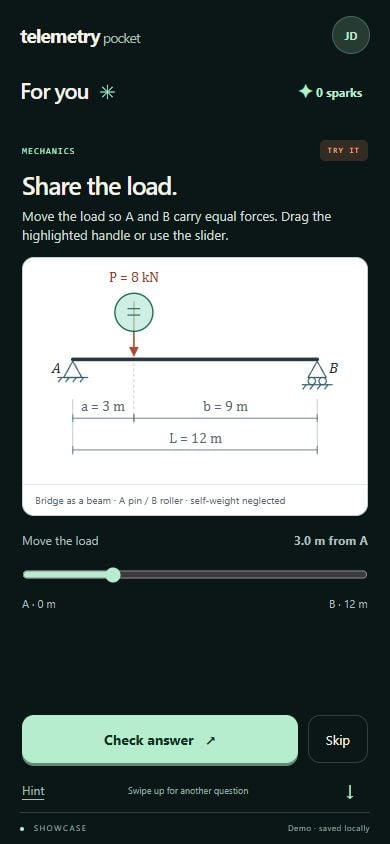
Move a load. Understand equilibrium.
Loading the interactive bridge… If it does not appear, reload the page or watch the tour below.
Telemetry in 30 seconds
Real demo footage. A closer look.
Press play. No sound needed.
The bridge demo is local and unsaved. Course answers are saved in the application after a confirmed save. Course access is currently administered for testing. Completion is not proof of mastery.
Meet Telemetry Pocket · prototype
A feed you don’t just watch.
You figure things out.
Share a bridge’s load. Solve a signal. Account for every joule. Pocket turns a spare moment into a short, interactive mission—with quick feedback, optional hints and a new angle to try.
Working browser prototype · no account needed.
Demo progress stays in this browser. Not connected to course grades.
Pocket: short interactive practice, quick feedback and small celebrations.
Telemetry: guided course study, longer problems and independent checkpoints.
The planned connection: explore in Pocket, tackle a related problem in Telemetry, then return for recall. Shared accounts, cross-device progress and checkpoint-based unlocks are not connected in this prototype.
Sparks celebrate demo practice. They are not grades or evidence of mastery. There is no installed mobile-app release yet.
02 / Living Problems
Change a parameter. Predict the effect. Test what happens.
Living Problems turns selected exercises into small interactive experiments: forces, support reactions, whole trusses, compatible motion and virtual work. Explore the relationships, then try a reviewed variant yourself.
Bounded teaching models—not a universal simulator. The course mechanics engine uses selected 2D models. The jet showcase adds a 3D view with a simplified cycle calculation, not CFD or FEM.
03 / The story so far
From LectureFlow to Telemetry.
A project evolving through building,
questioning and simplifying.
Make lecture recordings easier to navigate: searchable transcripts, summaries and questions grounded in the material. Bring order to the lecture pile.
The project grew into a study workspace. The question became: once the information is organised, how does a student actually learn from it?
Course-based exercises, mathematical notation and reusable learning content moved the focus from reading outputs to working through problems.
Guided practice, saved progress, memory checks and interactive experiments come together around one clear next study action.
“LectureFlow began with making lectures easier to navigate. Telemetry is becoming a way to turn them into understanding.”The idea behind the project
A thoughtful use of technology
AI can help prepare material and support more complex review. Prepared packs and the current interactive engine do not need a new AI call for every question viewed or solved.
Keep the learning visible and the machinery in the background. Hints and detail stay optional; saved work stays within reach.
A score is not proof of mastery. Telemetry is a working application, still being refined. Its effect on learning and retention needs to be tested with real students.
The practical details
A browser-based study application connecting course material, practice, feedback and follow-up checks. It began as LectureFlow and evolved towards helping students actively use what they study.
Not yet. Pocket is a separate, mobile-friendly browser prototype with local demo progress. Shared sign-in, course handoffs and recall are planned, not active. You can try Pocket without an account.
Access is currently administered for testing. An account and access to the relevant course are required. This website does not automatically create or approve accounts.
No personal AI key is required to work through prepared module packs or the current Living Problems pilot. Application operators configure any AI services used for content preparation or additional review.
Learning packs can contain content for different subjects. Coverage depends on the available, reviewed material. Interactive models are narrower: each subject needs its own reviewed equations, constraints and question library. The 2D mechanics exercises and this educational jet-cycle showcase do not solve arbitrary questions.
Not yet. The application works, but that is different from demonstrating learning gains. Real-student testing and delayed, unaided problem solving are needed to evaluate that ambition.
The next chapter
Telemetry is being prepared for a small, administered student pilot.
The next step is learning from the people it is built for.
Sign in with an approved tester account. Course access is managed separately.